Which BMW Diagnostic Tool Do I Need?
If you own a BMW and want to carry out your own diagnostics, one of the first questions is often: which diagnostic tool do I actually need?
There are plenty of BMW diagnostic cables, scanners and software packages available, but they are not all designed to do the same job. Buying the most expensive system is not necessarily the answer either – if you only need to diagnose or code one particular BMW, a relatively inexpensive BMW-specific interface may be all you need.
At Diagnostic Central we work with vehicle diagnostic equipment every day. In our own workshop we generally use Delphi/Autocom for BMW diagnostics because we work on many different makes and models and it performs virtually all of the everyday diagnostic work we require.
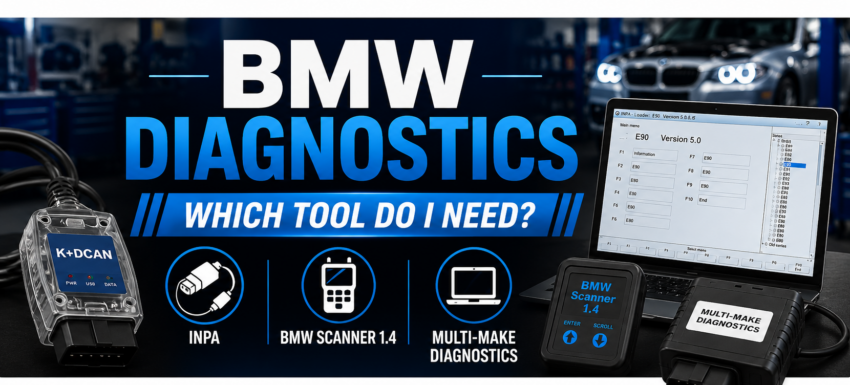
However, for somebody working on their own BMW, buying a complete professional multi-make diagnostic system may be unnecessary. This is why we also stock lower-cost BMW-specific equipment such as BMW Scanner 1.4 and BMW INPA K+DCAN.
BMW Scanner 1.4 – A Useful Option for Older BMWs
BMW Scanner 1.4 is primarily useful for older-generation BMW vehicles and can be particularly handy for certain coding, configuration and diagnostic functions.
We occasionally still use BMW Scanner 1.4 ourselves when carrying out certain coding functions on older BMWs, generally vehicles up to around 2005 depending on the particular model and system involved.
For an owner with an older compatible BMW who wants to carry out a particular diagnostic or coding job, it can therefore be a much cheaper solution than purchasing a complete professional diagnostic system.
Typical uses can include reading and clearing BMW-specific fault codes, viewing vehicle and module information and accessing certain coding or configuration functions on compatible vehicles.
Important: compatibility and available functions vary considerably between BMW models, production dates and control modules. BMW Scanner 1.4 should not be considered a universal diagnostic solution for every BMW.
BMW INPA K+DCAN – BMW-Specific Diagnostics for E-Series Cars
INPA is well known amongst BMW owners, enthusiasts and technicians. When used with a suitable K+DCAN interface, it can communicate with BMW-specific control modules and provide considerably more information than a basic generic OBD-II fault-code reader.
A suitable INPA K+DCAN interface can provide functions such as:
- Reading and clearing BMW-specific fault codes
- Viewing live data
- Identifying control modules
- Reading vehicle and VIN information
- Viewing coding and configuration information
- Carrying out adaptations on supported systems
- BMW coding functions where supported
The exact functions available depend on the BMW model, production date, control module and software being used.
Why Does a BMW K+DCAN Cable Have a Switch?
This is one of the most common sources of confusion when buying a BMW diagnostic cable.
BMW changed the way diagnostic communication was handled across different vehicle generations. Some earlier vehicles use K-Line diagnostic communication arrangements, while later E-Series vehicles use D-CAN.
On some older BMWs, access to different systems can involve the diagnostic connections on pins 7 and 8 of the OBD socket. A switched K+DCAN interface allows the relevant connection to be changed rather than permanently fixing the cable in one configuration.
This is important because a cable configured incorrectly for the vehicle can sometimes communicate with certain systems while failing to communicate with others.
For example, somebody may find that their diagnostic software communicates with the engine ECU but cannot see some of the other control modules. The interface configuration is one of the things that should be checked when this happens.
A switched interface therefore provides greater flexibility when working across different compatible BMW generations.
Does the Chipset in a K+DCAN Cable Matter?
The USB communication chipset and overall construction quality of the interface are important considerations, particularly when the equipment is being used for diagnostic communication or coding.
Externally, many BMW diagnostic cables look virtually identical. Internally, however, the components and build quality can vary considerably.
Our BMW INPA K+DCAN interface uses an FT232RQ chipset and incorporates the K-Line/D-CAN switch rather than being supplied as an unspecified generic USB diagnostic cable.
View our BMW INPA K+DCAN FT232RQ Diagnostic & Coding Cable
What About Delphi/Autocom for BMW?
If you regularly work on different makes of vehicle, a multi-make diagnostic system is often a more practical investment than buying separate manufacturer-specific interfaces.
This is the approach we normally take in our own workshop.
For everyday BMW diagnostic work we generally use our Delphi/Autocom system. It gives us the multi-system diagnostic coverage we need while also allowing us to use the same equipment on vehicles from many other manufacturers.
Depending on the BMW and control system, multi-make diagnostics can provide access to areas such as:
- Engine management
- ABS and braking systems
- Airbag/SRS
- Automatic transmission
- Body and comfort systems
- Service functions
- Live data
- Actuator/component tests
- DPF-related diagnostic functions on applicable diesel vehicles
For a garage, mobile mechanic or somebody maintaining several different vehicles, this is generally far more useful than having a diagnostic system that only works with BMW.
Do I Need INPA or Delphi/Autocom?
That really depends on what you intend to do.
If you own one compatible BMW and need a relatively inexpensive way of carrying out BMW-specific diagnostics or certain coding functions, INPA with a good-quality K+DCAN interface can make a lot of sense.
If you work on several makes of vehicle, however, investing in a good multi-make diagnostic system is normally the better option.
This is precisely why we use Delphi/Autocom for most everyday diagnostic work in our own workshop but continue to stock BMW-specific interfaces for customers who simply don’t need a complete multi-make system.
What About ENET and BMW ICOM?
Owners of later BMW generations may come across references to ENET cables and BMW ICOM interfaces.
These are different interfaces intended for later BMW communication systems and more specialised diagnostic, coding or programming requirements.
A K+DCAN interface should therefore not be assumed to be the correct tool simply because the vehicle has a BMW badge.
For later BMWs or specialist programming work, the correct interface depends on the vehicle platform, production date and the task being carried out.
Can a Cheap Generic OBD Scanner Diagnose a BMW?
Yes – but there is an important difference between basic OBD diagnostics and manufacturer-level diagnostics.
A basic generic OBD-II reader can be perfectly useful for reading emissions-related engine fault codes. However, a modern BMW contains many control modules besides the engine ECU.
Depending on the vehicle, these can include ABS, airbag/SRS, transmission, body control, climate control, parking systems, instrument cluster and numerous other electronic systems.
If the fault you are trying to diagnose is outside the basic engine/emissions system, a simple generic OBD reader may not provide the access you need.
Which BMW Diagnostic Tool Should I Buy?
As a simple guide:
- Older BMW and certain coding/configuration jobs: BMW Scanner 1.4 may be the most economical option on compatible vehicles.
- Compatible BMW E-Series and BMW-specific diagnostics/coding: INPA with a good-quality switched K+DCAN interface is often a good choice.
- Working on BMW plus other manufacturers: a Delphi/Autocom multi-make diagnostic system will usually be the more useful investment.
- Later BMW platforms or specialist programming: you may require different BMW-specific equipment such as ENET or ICOM depending on the vehicle and job.
Not Sure Which One You Need?
Diagnostic equipment should always be selected according to the vehicle and the job you actually need to perform, rather than simply buying the scanner with the longest list of advertised functions.
If you’re unsure which diagnostic equipment is suitable for your BMW, use the chatbot on our website and tell it your BMW model, year and what you are trying to diagnose, reset or code. It can help point you towards the most appropriate equipment available from Diagnostic Central.
Alternatively, contact us before purchasing and we’ll help you determine which system is most suitable.
Please note: Diagnostic and coding functions vary according to vehicle model, production date, installed control modules and software. Never assume that every listed function is available on every vehicle.